Friday, February 26, 2021

Send selected records from Temp Form Datasource to Class

 Recently, I had the need to send selected records of Form datasource that is a Temp table. 

The initial searches led me to the MultiSelectionHelper class with code something like this in my class:

MultiSelectionHelper helper = MultiSelectionHelper::construct();
helper.parmDataSource(_args.record().dataSource());

myTempTable = helper.getFirst();

while (myTempTable.RecId != 0)
{
    ... [LOGIC] ...
    myTempTable = helper.getNext();
}

This did NOT work at all.  I tried every type of table; Temp, InMemory, Regular.  I could not get MultiSelectionHelper to work.

So, I ended up using FormDataSource:

FormDataSource fds;
fds = _args.record().dataSource();

myTempTable = fds.getFirst(true);

while (myTempTable.RecId != 0)
{
    ... [LOGIC] ...
    myTempTable = fds.getNext();
}

Very similar code.  Just be sure to put 'true' in your call to 'getFirst' on the FDS object as that will ONLY retrieve marked / selected records.

Friday, February 5, 2021

General Ledger - Foreign Currency Revaluation

 Recently, I was brought into a conversation with my customer about their Foreign Currency Revaluation process.  

They felt that the standard process in AX wasn't doing it correctly based on their manual calculations so I did some research and debugging to figure out that basics of how this works.

Here is our sample parameters:


This is run in an entity that uses GBP as it's accounting currency.  Our parameters would suggest that we want to revalue transactions in Jan. of 2021.  However, due to my account being an 'Asset' account, the system changes my 'From' date to the beginning of my fiscal year. (In this case 11/1/2020) 
This causes the revaluation to be run for the entire year each time I run it, instead of just for the month I have specified.

I would be interested to know if this is standard accounting practice or if this is a bug in the system. 

As an FYI, the system will revalue the transactions using an exchange rate from the 'To' date specified in the parameter form.


Tuesday, October 6, 2020

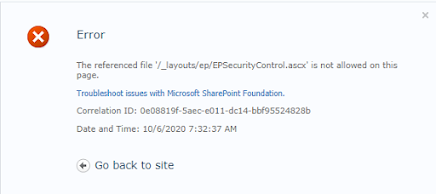
AX 2012 EP - 'The referenced file '/_layouts/ep/EPSecurityControlascx' is not allowed on this page'

 This morning I woke up to the following error in Enterprise Portal:

We tried 'IISRESTART' and full restarts of our EP and AX servers.

I then looked at the web.config file and found that it had been modified last night. I also found the some Sharepoint security updates had come through as well.  I knew the web.config was the issue but had no way of knowing what it was.

After posting on the AX forum, a great user gave me the solution.

https://community.dynamics.com/ax/f/microsoft-dynamics-ax-forum/404119/ep-the-referenced-file-is-not-allowed-on-this-page/1098599#1098599

In the <SafeMode><PageParserPaths> HERE </PageParserPaths></SafeMode> you need to put:

<PageParserPath VirtualPath="/*" CompilationMode="Always" AllowServerSideScript="true" AllowUnsafeControls="true" IncludeSubFolders="true"></PageParserPath>

Once I put that in there, it worked perfectly!  No need to uninstall the updates. 


Tuesday, September 15, 2020

When trying to open a view I get 'You are not authorized to access table ‘My View’ (MyView). Contact your system administrator.'

 I was recently trying to open a view and received the following error:

You are not authorized to access table ‘Payments remaining amounts’ (VRFVendPaymentsNotSettled). Contact your system administrator.

Other posts on this topic suggested that you need 'Fields' on the view to open it.  In my case I had fields. This turned out to be a simple fix.  On the view properties, in AX, change 'Visible' to 'Yes' from 'No'.

Tuesday, March 31, 2020

AX 2012 R2 - OANDA Exchange Rate Provider API V2

Recently, I have been tasked with getting exchange rates from an online service.  I came across a white paper that explains how to setup an exchange rate provider.  For the most part it is accurate.  I came across 2 compile errors that required minor changes along with a few of other changes needed to make it work with V2 of Oanda's API.  If you can get your 'ExchangeRateProviderOanda' class from the white paper, you should be able to follow my changes and make the provider work.
****Note: This is setup for a single currency exchange rate for a single day.  You can get averages over multiple days using the 'Candles' request instead of the 'Candle'

Classes\ExchangeRateProviderOanda\classDeclaration
Line 2 Original Code:
ExchangeRateProviderIdAttribute('CB024E9B-312B-44CE-BE89-3ED8597B007D')
Change To:
ExchangeRateProviderIdAttribute('CreateNew')
Create your own, unique GUID. You can do this in a Job in ax with the following code:
info(strFmt("%1", WinAPI::createGUID()));

Classes\ExchangeRateProviderOanda\classDeclaration
Lines 21 & 22 Original Code:
#define.BidXPath("//bid")
#define.DateXPath("//quote/date")
Change To:
#define.BidXPath("//average_bid")
#define.DateXPath("//quote/close_time")
These will get us the right xml nodes for the 'Bid' exchange rate and the quote date.

Classes\ExchangeRateProviderOanda\getProviderId
Change To:
return 'YourNewlyCreatedGuid';
Copy your new GUID from above.

Classes\ExchangeRateProviderOanda\getConfigurationDefaults
Line 5 Original Code:
configurationDefaults.addNameValueConfigurationPair(#ServiceURL, 'https://www.oanda.com/rates/api/v1/rates/%1.xml?quote=%2&start=%3&end=%4&fields=averages');
Change To:
configurationDefaults.addNameValueConfigurationPair(#ServiceURL, 'https://www.oanda.com/rates/api/v2/rates/candle.xml?base=%1&quote=%2&date_time=%3');
This is the V2 URL for the 'Candle' rate type.
  
Classes\ExchangeRateProviderOanda\getExchangeRates
Lines 41 & 42 Original Code:
fromDate = _exchangeRateRequest.parmFromDate();
compareResult = fromDate.CompareTo(_exchangeRateRequest.parmToDate());
Change To:
fromDate = _exchangeRateRequest.parmFromDate();
compareResult = fromDate.CompareTo(fromDate);
The 'CompareTo' method can't handle the 'Date' type in 'parmFromDate'. In essence, it was simply trying to compare the date to iteslf so I passed the 'fromDate' variable instead.

Classes\ExchangeRateProviderOanda\getExchangeRates
Line 61 Original Code:
oandaRequestString = strFmt(serviceUrl,currencyPairRequest.parmFromCurrency(), currencyPairRequest.parmToCurrency(), dateForRequest, dateForRequest);
Change To:
oandaRequestString = strFmt(serviceUrl, currencyPairRequest.parmFromCurrency(), currencyPairRequest.parmToCurrency(), dateForRequest);
This changes our 'oandaRequestString' to use the new url format and put the variables in the right spots.

Classes\ExchangeRateProviderOanda\getExchangeRates
Line 18 Original Code:
System.DateTime                     fromDate, fromUTCDate;
Change To:
 System.DateTime                     fromDate, fromUTCDate, toDateDateTime;
This is needed for our next fix.

Classes\ExchangeRateProviderOanda\getExchangeRates
Lines 118 & 119 Original Code:
fromDate = fromDate.AddDays(1);
compareResult = fromDate.CompareTo(_exchangeRateRequest.parmToDate());
Change To:
fromDate = fromDate.AddDays(1);
toDateDateTime = _exchangeRateRequest.parmToDate();

compareResult = fromDate.CompareTo(toDateDateTime);
Similar to the issue above. The 'CompareTo' can't handle the 'Date' type in 'parmToDate'. We created a new 'System.DateTime' variable called toDateDateTime and then set that variable to the 'parmToDate()'. We can then pass this variable to the 'CompareTo' method.

Classes\ExchangeRateProviderOanda\getExchangeRates
Line 71
//webCollection.Add(#HttpHeaderAuthorization, #KeyTokenPrefix + TODO: Retrieve and concatenate your Key provided by OANDA);
Change To:
webCollection.Add(#HttpHeaderAuthorization, #KeyTokenPrefix + 'YourApiKey');
Put your OANDA provided API key here.

OPTIONAL:
Classes\ExchangeRateProviderOanda\getExchangeRates
Line 102 Original Code:
catch (Exception::CLRError)
{
{Comments}
}
Change To
catch (Exception::CLRError)
{
ex = CLRInterop::getLastException();
   if (ex != null)
   {
         ex = ex.get_InnerException();
         if (ex != null)
         {
              error(strFmt("From Currency:%1 - To Currency: %2 - Date: %3",      currencyPairRequest.parmFromCurrency(),
                            currencyPairRequest.parmToCurrency(), oandaRequestString));
          }
    }
}
I just put in some error handling so that if my batch job errors out, I will be able to see some details.

Once you do this, compile into CIL.  Then create your new provider through GL -> Setup -> Currency -> Configure exchange rate providers
       

Then run Gl -> Periodic -> Import currency exchange rates:

This will create exchange rates for Today for all currency pairs that you have in the system.
****Note: Daily exchange rates are posted at 0:00 UTC. For us in the US that means I can get the March 31 rate at 5:00 pm PT or 8:00 pm ET March 31. If you try and get a 'Candle' rate before then, your web api call will fail.

And that's it!  This could easily be setup as a batch job and wouldn't require further intervention. Not a hard way to get exchange rates automatically pulled in to AX.




Wednesday, November 20, 2019

AX 2012 R2 - SSRS - The formatter thew an exception while trying to deserialize the message

This strange error popped up with one of my users the other day while running a report that use on a regular basis:

The formatter threw an exception while trying to deserialize the message: There was an error while trying to deserialize parameter http://tempuri.org/:queryBuilderArgs. The InnerException message was 'Element 'http://tempuri.org/:queryBuilderArgs' contains data from a type that maps to the name 'http://schemas.datacontract.org/2004/07/XppClasses:SrsReportProviderQueryBuilderArgs'. The deserializer has no knowledge of any type that maps to this name. Consider using a DataContractResolver if you are using DataContractSerializer or add the type corresponding to 'SrsReportProviderQueryBuilderArgs' to the list of known types - for example, by using the KnownTypeAttribute attribute or by adding it to the list of known types passed to the serializer.'.  Please see InnerException for more details.

A quick google search revealed most people restarting the AOS / SSRS servers to get it to clear out.
Luckily I found this post here.  This solved my problem. 

Tuesday, November 12, 2019

SQl Server SSMS - Get letters from beginning of string

I had a requirement, in SSMS, where I needed to get the first letters of a Voucher string. It could be anywhere from 3-6 letters so I couldn't hard code a start and end point.

I ended up coming up with this:

SUBSTRING([MyCol], 1, PATINDEX('%[^a-z]%', [MyCol]) - 1)

I was able to put a start of '1' as my Voucher letters ALWAYS come at the beginning.  The 'PATINDEX' finds the column AFTER my letters end.  So, I subtract 1 and I've found the end!