Thursday, March 9, 2023

AX 2012 R2 CU9 DIXF Data Export

 As we are now moving to D365, we need to export our data. Our partner assumed we had DIXF, however, we are in CU6 and it doesn't have DIXF.

In order to use DIXF we upgrade one non-production environment to CU9. (Microsoft recommended either CU8 or CU9 not CU7).

Once we upgraded that, we could then use DIXF.  However, this left an issue of how to get new data from PRODUCTION into this CU9 environment.

  1. Using the test data transfer tool, export out ALL DMF tables.
  2. Refresh non-production environment transactional DB as usual. (DO NOT refresh model DB)
  3. Run CU9 KB upgrade to upgrade the DB
  4. Run and complete the software update checklist.
  5. Using the test data transfer tool, import ALL DMF tables.
Although this does take me about 3 hours to complete it gets the job done.  Steps 1 and 5 allow us to continue to develop our data entities in DIXF and perform refreshes without losing out progress.

AX 2012 Workflow Originator

 Recently, I had a request to bulk close out 500+ cases that were currently in workflow.  The issue I came to was I couldn't find where the workflow was pulling the 'Workflow originator' from. After some research, I found that it is stored in the SysWorkflowTable and the Originator field.

Tuesday, January 24, 2023

AX 2012 to D365 Data Upgrade: Incremental sync did not complete successfully

 Well, we are finally doing an upgrade to D365!  It's exciting to get into this chapter of our ERP.

While attempting a data upgrade to D365, I ran into the following error when running the data upgrade 'execute' portion of the script:

AOS database sync failed. Microsoft.Dynamics.AX.Framework.Database.TableSyncException: Incremental sync did not complete successfully. Error: ArgumentException:tableId.

   at Microsoft.Dynamics.AX.Framework.Database.Tools.LegacyCodepath.<>c.<RunPartialTableSync>b__23_1(Tuple`2 result)

   at Microsoft.Dynamics.AX.Framework.Database.Tools.LegacyCodepath.ExecuteWithinAOS(SyncOptions syncOptions, String sqlConnectionString, IMetadataProvider metadataProvider, Func`1 func, Action`1 errorHandler)

   at Microsoft.Dynamics.AX.Framework.Database.Tools.LegacyCodepath.RunPartialTableSync(SyncOptions options, String sqlConnectionString, IMetadataProvider metadataProvider)

   at Microsoft.Dynamics.AX.Framework.Database.Tools.SyncEngine.PartialTableViewSync()

   at Microsoft.Dynamics.AX.Framework.Database.Tools.SyncEngine.PartialSync()

   at Microsoft.Dynamics.AX.Framework.Database.Tools.SyncEngine.RunSync()

   at Microsoft.Dynamics.AX.Framework.Database.Tools.SyncEngine.Run(String metadataDirectory, String sqlConnectionString, SyncOptions options)

Failed operation step '/DataUpgrade/PreReqs/PartialDbSync'

Process 'K:\AosService\PackagesLocalDirectory\bin\SyncEngine.exe' failed with exit code -1; see error logs for details.

   at Microsoft.Dynamics.Servicing.DataUpgrade.Operations.Operation.RunProcess(String fileName, ArgumentsBuilder args)

   at Microsoft.Dynamics.Servicing.DataUpgrade.Operations.OperationStep.Execute()

I'm not sure, at this point, what the issue is.  Still researching...


Friday, February 26, 2021

Send selected records from Temp Form Datasource to Class

 Recently, I had the need to send selected records of Form datasource that is a Temp table. 

The initial searches led me to the MultiSelectionHelper class with code something like this in my class:

MultiSelectionHelper helper = MultiSelectionHelper::construct();
helper.parmDataSource(_args.record().dataSource());

myTempTable = helper.getFirst();

while (myTempTable.RecId != 0)
{
    ... [LOGIC] ...
    myTempTable = helper.getNext();
}

This did NOT work at all.  I tried every type of table; Temp, InMemory, Regular.  I could not get MultiSelectionHelper to work.

So, I ended up using FormDataSource:

FormDataSource fds;
fds = _args.record().dataSource();

myTempTable = fds.getFirst(true);

while (myTempTable.RecId != 0)
{
    ... [LOGIC] ...
    myTempTable = fds.getNext();
}

Very similar code.  Just be sure to put 'true' in your call to 'getFirst' on the FDS object as that will ONLY retrieve marked / selected records.

Friday, February 5, 2021

General Ledger - Foreign Currency Revaluation

 Recently, I was brought into a conversation with my customer about their Foreign Currency Revaluation process.  

They felt that the standard process in AX wasn't doing it correctly based on their manual calculations so I did some research and debugging to figure out that basics of how this works.

Here is our sample parameters:


This is run in an entity that uses GBP as it's accounting currency.  Our parameters would suggest that we want to revalue transactions in Jan. of 2021.  However, due to my account being an 'Asset' account, the system changes my 'From' date to the beginning of my fiscal year. (In this case 11/1/2020) 
This causes the revaluation to be run for the entire year each time I run it, instead of just for the month I have specified.

I would be interested to know if this is standard accounting practice or if this is a bug in the system. 

As an FYI, the system will revalue the transactions using an exchange rate from the 'To' date specified in the parameter form.


Tuesday, October 6, 2020

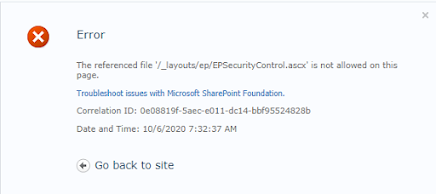
AX 2012 EP - 'The referenced file '/_layouts/ep/EPSecurityControlascx' is not allowed on this page'

 This morning I woke up to the following error in Enterprise Portal:

We tried 'IISRESTART' and full restarts of our EP and AX servers.

I then looked at the web.config file and found that it had been modified last night. I also found the some Sharepoint security updates had come through as well.  I knew the web.config was the issue but had no way of knowing what it was.

After posting on the AX forum, a great user gave me the solution.

https://community.dynamics.com/ax/f/microsoft-dynamics-ax-forum/404119/ep-the-referenced-file-is-not-allowed-on-this-page/1098599#1098599

In the <SafeMode><PageParserPaths> HERE </PageParserPaths></SafeMode> you need to put:

<PageParserPath VirtualPath="/*" CompilationMode="Always" AllowServerSideScript="true" AllowUnsafeControls="true" IncludeSubFolders="true"></PageParserPath>

Once I put that in there, it worked perfectly!  No need to uninstall the updates. 


Tuesday, September 15, 2020

When trying to open a view I get 'You are not authorized to access table ‘My View’ (MyView). Contact your system administrator.'

 I was recently trying to open a view and received the following error:

You are not authorized to access table ‘Payments remaining amounts’ (VRFVendPaymentsNotSettled). Contact your system administrator.

Other posts on this topic suggested that you need 'Fields' on the view to open it.  In my case I had fields. This turned out to be a simple fix.  On the view properties, in AX, change 'Visible' to 'Yes' from 'No'.